Inspect the physical surface or message
Look for sticker edges, alterations, printing errors, or an explanation that does not fit the location. If the QR code arrived without context, do not scan it yet.
See the destination before opening it
Quishing hides a phishing link inside a QR code. Before scanning an unexpected or tampered code, inspect its source and analyze the extracted URL instead of sending it straight to your browser.
What quishing means
A QR code simply represents data. When it contains a URL, a camera may offer to open it even though the user never typed or carefully read the domain. Attackers use that jump to lead people to pages that impersonate known services, request credentials, or try to start a download.
The risk is higher when a code appears on a sticker, parking meter, invoice, unexpected package, or message that demands immediate action. Professional design does not prove that the destination is legitimate.
Scan with a review step
Look for sticker edges, alterations, printing errors, or an explanation that does not fit the location. If the QR code arrived without context, do not scan it yet.
Use the camera for a visible code or select a saved image from the gallery. The gallery option lets you continue without granting camera access.
EdgePhishGuard recognizes the code and returns the URL to its analysis flow. You can review the destination before deciding whether to interact with it.
Confirm that the domain exactly matches the expected service. The app combines URL rules, reputation data, and phishing patterns, with primary analysis on the device.
For payments, banking, government services, or personal accounts, open the official app or type an address you already trust. Do not enter information through the suspicious QR destination.
Where it appears
Confirm that the code belongs to the real operator and that no sticker covers it. Use an official app when one is available.
An unsolicited parcel may include a QR code to trigger curiosity. Do not grant permissions or provide information to discover who sent it.
A public code can be replaced. Check the displayed domain and ask the business if the destination does not match its identity.
A QR code embedded in an image can move the click to a phone and hide the address. Save the image and analyze it before opening the result.
After extracting the QR code
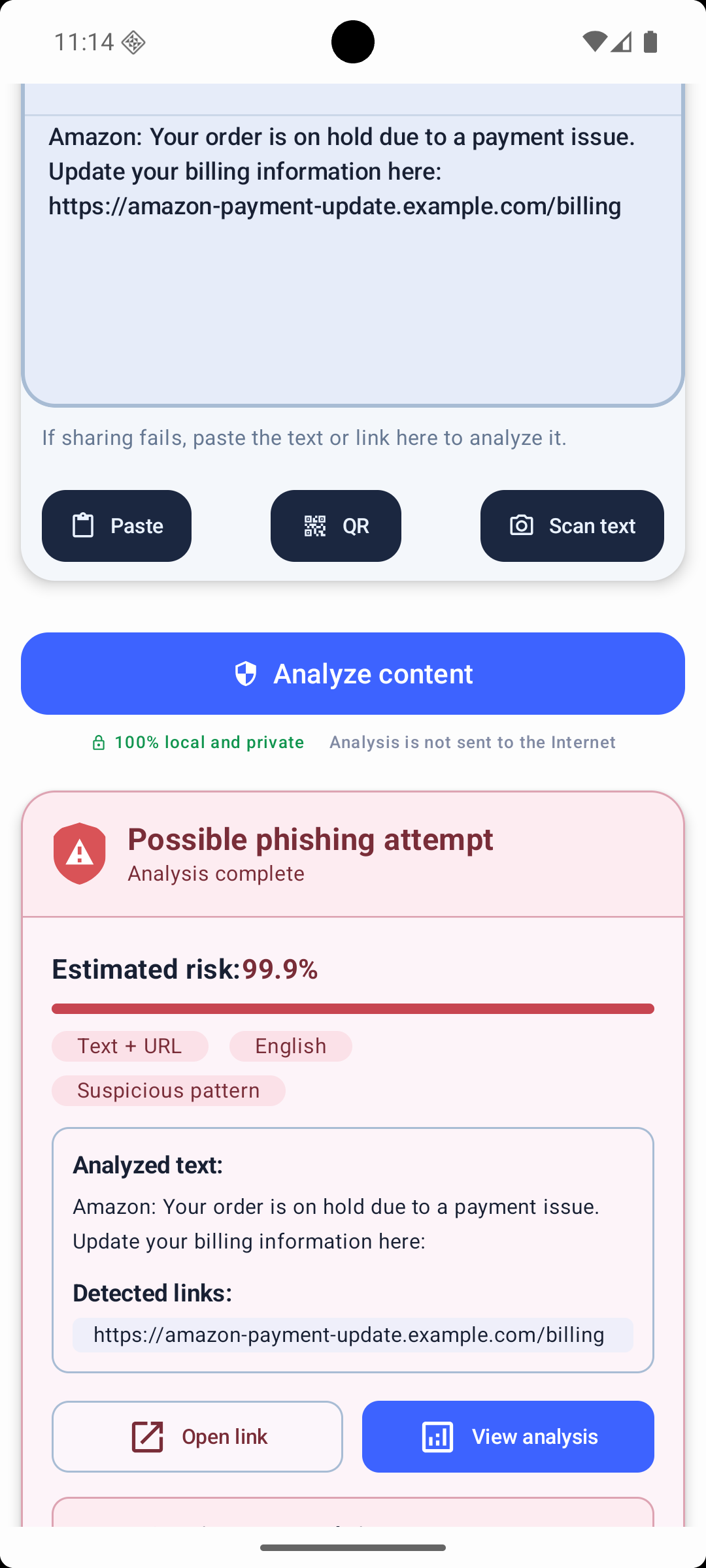
The app does more than read the code. The extracted link enters the same risk-analysis flow as a pasted or shared URL, showing the domain, estimated probability, and relevant signals.
A low result does not guarantee that an unknown page is safe. If the context, sender, or request is unusual, avoid the destination and verify through another route.
Independent guidance
The U.S. Federal Trade Commission advises people to inspect the URL before opening an unexpected QR code, watch for spoofed domains, and contact an organization through a website or number they already know is real.
Limits and questions
EdgePhishGuard is designed to reveal and analyze the content before browser handoff so you can inspect the destination first.
Yes. QR and OCR functions can process compatible saved images as well as camera input.
No. New, redirected, or compromised destinations may not produce strong known signals.
No. Treat the result as an additional check and verify payment or sign-in requests independently.
Also useful
QR scanning with a security pause
Install EdgePhishGuard from Google Play and use the camera or gallery to extract and analyze the destination of a suspicious QR code.