Pause and keep the context
Do not reply or open the destination. Consider who sent the content, what action it requests, and whether the communication was expected.
Security before you click
If a message pressures you to sign in, pay, or act immediately, pause before opening its link. Inspect the domain and use EdgePhishGuard as an additional check of the URL.

First check
A button may say “Bank,” “Delivery pending,” or “Verify account,” while its real destination uses an unrelated domain. Long-press to preview the link or copy it without opening it when the source app supports that action.
Read the domain carefully. Extra subdomains, swapped letters, unnecessary hyphens, lookalike characters, or an unexpected top-level domain can indicate impersonation. HTTPS encrypts the connection, but it does not prove that the site itself is trustworthy.
Recommended process
Do not reply or open the destination. Consider who sent the content, what action it requests, and whether the communication was expected.
Use the copy-link option or share the text with EdgePhishGuard. If the address is inside a screenshot, import the image and extract the URL with OCR.
Look for misspellings, visually similar characters, extra names before the recognized domain, and paths designed to imitate a login page.
Paste or share the URL. The app combines structural URL rules, compact reputation lists, and phishing signals, with the primary analysis running on the device.
If the message claims to represent an organization, open its official app or type its known address yourself. Do not use contact details from the suspicious message.
Interpret the result
No strong signals exceeded the configured threshold. Still verify the sender and domain when a request is unexpected.
The URL contains details that deserve a second check. Do not enter information until the destination is confirmed through an official channel.
Enough signals were triggered to recommend that you avoid the link and do not share credentials, codes, or financial information.
Domains, campaigns, and tactics evolve. No detector can guarantee that it will identify every threat, and a low result does not make an unexpected request trustworthy.
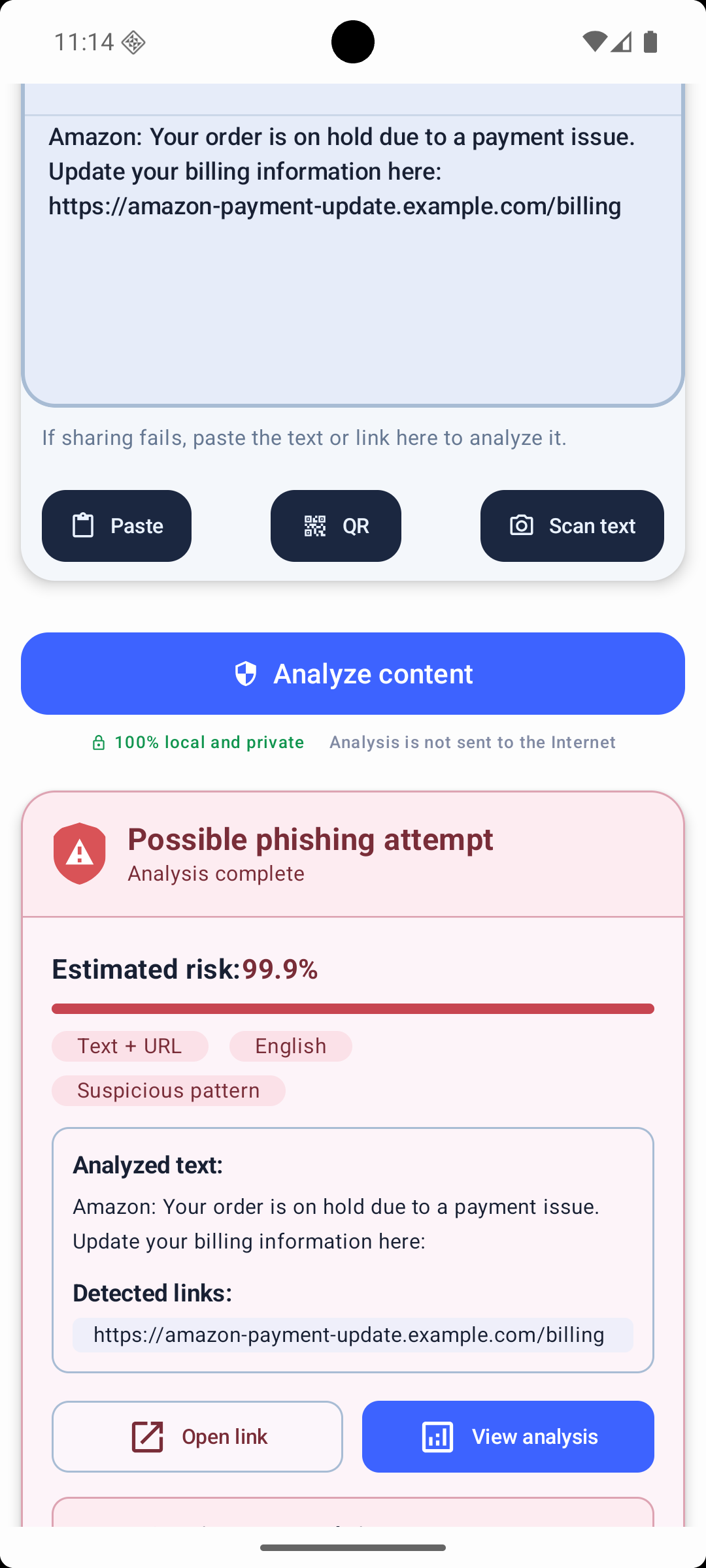
Visible evidence
EdgePhishGuard displays the estimated probability, domain, and signals behind a warning. The goal is to provide context instead of asking you to trust only a “safe” or “dangerous” label.
Analyzed content is not sent to a server for phishing detection. Separate remote services may support configuration, list updates, or app stability, as explained in the privacy policy.
Independent guidance
CISA advises people to recognize urgent or emotionally appealing language, requests for personal information, and incorrect addresses or links. If a request may be genuine, contact the organization through information you already trust.
Limits and questions
No. Verify sensitive requests through a trusted app, saved bookmark, or known phone number.
Do not rely on the visible short domain. Reveal the destination where possible and confirm the request independently.
No direct text-message monitoring is advertised. Paste or share the content, or enable compatible notification analysis.
No. It provides additional evidence and cannot guarantee detection of every threat.
Next guide
An additional Android check
Install EdgePhishGuard from its official Google Play listing. Do not open a link solely because a tool found no strong signals.